Lec 1 - Introduction to Operating Systems
Operating system: A program that allows the user to interact with the low level hardware, so that the user does not need technical knowledge to run their computer.
What does the OS do?
- Allocates resources - Manages computer resources as efficiently as possible
- Program control - It controls the programs the user needs to run and manages user input/output devices.
- Kernel - The main brains of the computer it controls.
Processes
Processes are programs which execute instructions on the computer. Each process requires resources which are allocated by the OS.
The process contains:
- The code
- The current activity
- Temporary data such as local variables
- Global variables
- Allocated memory (aka heap though the name has nothing to do with the data structure.)
Process control block
This includes info about the process:
- PID - the unique identifier
- State
- CPU utilisation
- Priority (used for scheduling)
Process state
There are 5 states it can go through while running:
- New - being created
- Running - Executing instructions
- Waiting - waiting for event to occur
- Ready - Waiting for the CPU to dispatch it.
- Terminated - Completed execution or removed by OS.
Child and parent processes
A process can have children process which each execute in the same way as the parent, forming a tree of processes.
They can share resources, share a subset of resources or share no resources. They can also execute concurrently or one after the other.
The kernel
This is the place which the processes live. It has 4 components:
- A "privileged" instruction set - Some instructions should only be available to the kernel such as managing interrupts, performing I/O, Halting processes.
- Interrupt mechanism - A signal by hardware or software to change a process. E.g mouse moves and an event interrupt occurs.
- First level interrupt handler (FLIH) determines the source of the interrupt and finds the correct process to deal with it.
- Memory protection - Only allow access to the parts of the memory each process is allowed.
- Real time clock
Dual mode
You have the user mode and the kernel mode and you only let users execute instructions that won't cause harm.
You swap to kernel mode when:
- Executing functions that need privileged instructions.
- an interrupt happens
- An error happens.
- An attempt is made to execute a privileged instruction while in user mode.
Dispatcher
This is the thing which take a ready process and then assigns it the resources so that it can begin executing. It also reassigns resources when a process is terminated.
Lec 2 - Process Management
Multiprogramming
independent processes: Processes that cannot be affected by the execution of other processes
Co-pendent processes: Process that may share data with other processes and rely on others to function
Advantages of multiprogramming
- Computation speed up
- Convenience
- Information sharing
- Modularity
Multiprogramming aims to maximize CPU use
- Several processes are kept in memory concurrently
- CPU scheduling is used to support multiprogramming process management.
CPU scheduling
- Viewed as processes "taking turns".
- provides fair and efficient way of sharing the ystem
Types of schedulers
- Long term: Selects processes to bring to ready queue
- Medium term: removes processes from active contention for the cpu by swapping processes in and out
- Short term: Short term selects the next process and allocates it to the cpu. processes
Short term scheduler
This selects the next process to allocate to the cpu.
it performs the decision when:
- running => waiting
- running => ready
- waiting => ready
- Terminate
Considerations
- System must save context of old process
- Must load saved context of new process
- This has an overhead
- So costs vs benefit
Criteria
- Cpu keeps busy
- Throughput
- Turnaround time
- Waiting time
- Response time
Scheduling algorithms
pre-empting: Taking off CPU
Algorithmic Evaluation
- Deterministic modelling: Take a predetermined workload and analyse performance
- Simulation: Complex model of the system
- Post-implementation: Examine the running operating system aka live testing
overview of algorithms
- First come first served
- Shortest job first
- Priority scheduling
- Round robin.
Lec 3 - CPU scheduling algorithms
Burst time: Time a process is on for.
Pre-emptive: Causes programs to stop executing before they're finished
First come, first served
Do the one which comes first first.
- Average waiting may or may not be lengthy
- Simple to implement
- may result in short processes waiting for long processes
- Non pre-emptive
Shortest-Job-first-SJF
Compares processes waiting to determine the length of next CPU burst and schedule one with shortest time
- Non pre-emptive
- Simple to implement
- Average waiting time is significantly better than FCFS
- Starvation: Long processes may forever be waiting for short processes.
Some things to note:
- If two programs are the same length they're chosen according to which arrived first.
- Once the project is on the CPU it will not be pre empted until it has completed it's burst time.
Round robin
Each process gets a time slice on the CPU and after that time has elapsed it is replaced with the next process from the front of the queue. it can be implemented with a normal queue (FCFS), a priority queue, or a priority queue for items competing for the back.
The time slice or time quantum is denoted with a q and it's usually 10 to 100 milliseconds.
- Round robin uses a priority queue to handle which process is going to be next to run.
- new processes always added to back of queue
- process runs till it has finished or uses up time slice then sent to back of queue
- If two processes are sent to the back of the queue at the same time the higher priority one goes first.
- next process chosen from front of queue.
Note: In an exam priority is given by a number e.g 1 - 5. The lower the number the higher the priority. So priority 1 is higher than priority 5.
Shortest remaining time first (SRTF)
If a new process arrives with a shorter remaining time than the current executing one it will pre empt it and take it's place.
If it isn't shorter it will wait it's turn until there is no item with a shorter remaining time than it in the queue.
Priority Scheduling
Process with highest priority takes cpu time.
Smallest integer = highest priority
- Can cause starvation because low priority processes may never execute.
- To solve this we could have ageing where a processes priority increases as time progresses or time quanta which is "round robin with priority".
- it can be implemented preemptive or non preemptive.
Multilevel queue
This is where you put processes into two different queues depending on their performance requirements (e.g how fast their response time needs to be). The aim is to make the computer run faster for the user, by giving the processes the user needs more attention.
- Ready queue partitioned into two queues foreground and background
- Each queue has a specific scheduling algorithm
- And there's a scheduling algorithm between queues.
- Foreground then after background
- Or each queue gets a certain timeslice
Feedback queues
These are where processes can jump from one queue to the next if their resource requirements change. It's difficult to implement in an efficient way.
- priority ageing may also be used.
Lec 4 - Process Management Part III
Threads
Basic unit of Cpu utilisation (subset of a process)
it has all the global variables from the process and threads can communicate with other parts.
benefits
- Responsive: process runs even if thread is blocked
- Resource sharing: Threads share resources of their process
- Economy: saves on allocating memory.
- Multiprocessor architectures: can run on more than one processor
- Can allow for high throughput.
Multithreading models
- Many-to-one: lots of threads swapped into the main thread
- One to one: Each thread goes onto one kernel thread
- Many to many: Depends on the operating system but with multiple kernel threads (aka more than one core) you can get true parrelisation
Example: windows
Schedules based on priority based pre-emptive scheduling
Thread runs until
- pre-empted by higher priority thread
- terminates
- time quantum (slice) ends
- System call is made
Lec 5 & 6 - Memory Management
In order for processes to run they need have access to memory. However the computer only has a finite amount of memory so just like we allocate CPU time we need to allocate memory space.
Types of memory
- Cache memory (on the cpu)
- Main memory (RAM)
- Storage memory (SSD)
- Virtual memory (SSD transformed into RAM)
Memory partition
There are two partitions one for kernel processes and one for user processes doing this is more efficient
Each partition is contained in a contiguous section of memory
Memory Hole allocation
When allocating a process memory what we do is find a hole in the main memory which is large enough to store the processes memory. We place memory in blocks instead of scattering it because when reading the memory if it's all together in one contiguous block of bytes it's alot more efficient to read.
hole: block of available memory
Allocation strategies
When picking a hole for the memory we can use 3 different strategies to decide which one to pick. Ideally we want:
- to have lots of leftover space for more processes
- For all the processes to be able to be allocated even if they are quite big.
We have the following strats:
- First-fit: allocate the first hole that is big enough
- Advantage: doesn't require a search
- Best fit: allocate smallest hole that fits
- Advantage: Can fit even the largest of processes
- Disadvantages: Requires search and leaves small left over hole that wastes space
- Worst fit: allocate largest hole that fits
- Advantages: Leaves biggest leftover whole for other processes
- Disadvantages: must search list. Removes big whole that are needed for big processes.
First fit and best fit usually considered better than worst fit.
Fragmentation
- External fragmentation: When there are scattered holes too small for contiguous process allocation.
- We can reduce this through compaction which shuffles memory contents to place free memory in one place
- Internal fragmentation: When allocated memory block is larger than actual memory.
- Can be caused by blocks needing to be a multiple of 2 size e.g 32 bytes. However process may need arbitrary sizes like 29 bytes which doesn't fit perfectly.
Paging
Virtual memory
Under ideal conditions we'd have all the processes memory in the main memory, however there often isn't enough space for that. So instead we have virtual memory.
Virtual memory is the idea of storing memory for processes that should be in the ram in a section of the harddrive and then swapping it out with the real stuff in the main memory when it's needed. Inorder for this to work we use a concept called paging.
What is paging?
This is storing a set of logical addresses which point to the actual real physical memory instead of just addressing the real memory.
- Logical addresses are divided into blocks called pages
- Physical memory divided up into blocks called frames
- Page table: a mapping from pages to frames.
- Each page has a page number (p) and page offset (d), where the address in physical memory is equal to p+d. p is stored in the page table.
paging means that a process and the developer writing code for the process doesn't actually need to care about how the underlying main memory is structured or work around the holes. They get instead an abstract view of things which they can much more easily work with.
Virtual Memory
Paging also means we can swap out the pages the process uses and put it in what's called the virtual memory. We do this by just removing the logical address to the frame and giving it to another process. The list of frames that are free to use in the physical address space is maintained by the OS when it gets full we start using the virtual memory.
Virtual memory: the ability to address more locations than the main memory has
Demand paging
This is where we only bring a page into main memory when it is required by the process during execution.
- Advantages: reduces the number of pages transferred and number of frames allocated to a process
- Disadvantages: Increases response time for processes since it has to load the page every time.
The demand paging algorithm
To begin we create the page table by giving each process all the pages it needs but no page is actually connected to the main memory. We store whether a page has a connected frame using a valid/invalid bit. At the start all pages have a valid/invalid bit of 0.
- A process requests the memory associated with one of it's pages.
- We check if the process is allowed to access the address connected to the page by checking if it has a valid memory protection bit
- If it doesn't have a valid one. We terminate the process, clear it's allocated memory and through an error message
- We check the page is allocated a frame in main memory yet. We do that by looking if the page table entry has a valid or invalid bit corresponding to whether it has a page in memory.
- If it has a frame we return the memory at the frame
- Else this is a page fault trap and we then search for a free frame to put the processes page data in
- If we find a free frame we read the data into it and then update the page table to connect the page to the frame.
- Else all frames are full and we move an exisitng page onto the hard drive (virtual memory) to make room for our page. This is called page replacement.
performance of demand paging
By performance we mean our fast can we access the page. We call this effective access time.
- let p = probability of page being in memory and a page fault not occuring
- Effective access time:
Page replacement algorithms
if there is no free frame we encounter a page fault and we need to move a victim page into virtual memory to make room for a new frame to connect to the page.
We need a page replacement algorithm to decide which page to swap out. The aim is to minimise the number of page faults.
Evaluating page replacement algorithms
- Run each algorithm on a string of memory references (reference string)
- Compute the number of page faults each algorithm has.
- Compare them and the one with lowest number of page faults wins.
- We can also compare it against the optimal algorithm which will always have the lowest possible page faults.
First in first out (FIFO)
The oldest page is the victim page. This is implemented with a queue.
FIFO suffers sometimes from belady's anomaly which is where the higher the number of allocated frames the higher the page fault rate.
Least recently used (LRU)
As the name suggests the least recently used page is swapped out.
- Implemented with a stack where when a page is used it gets moved to the top of the stack
- This cannot exhibit Belady's anomaly. (nore can any stack algorithm)
LRU approximation algorithms
- Additional reference bit: Keep extra bit in the page initially set to 0 and when a page is used set that bit to 1. Then always pick a page with bit =0 to remove.
- Second chance: Have a circular queue like in FIFO, but also have reference bits (initially set to 1) .
- When queue is full start from the top (aka first in) and pick a page with a bit = 0.
- Else if the page bit is set to 1 set it to 0 and check the next page.
- The result of this is we have a queue where some pages have been used so bit = 1 and others haven't so bit = 0. We pick an unused page (which was likely added early on since we start at the front of the queue). Then when we encounter a used page which was is the the oldest pages (e.g top of queue) we set it's bit to 0 so it can have a "second chance".
Optimal algorithm
This is used for comparison only. The algorithm is simple; you always pick the page which won't be used for the longest time, which of course makes it optimal.
The reason it's only theoretical is it requires knowing the future which the OS can't do.
Thrashing
This is when a process spends more time dealing with page faults then doing actual work. Aka the page fault rate is very high.
This can happen when a process gets allocated too few frames and as such needs to keep swapping in and out pages from virtual memory.
It's the reason your computer slows too a halt when you reach the limits of your ram capacity.
Prepaging
Load into memory all the pages that a process will need. Can be done by keep track of the pages a process needs in a working set and then if it's suspended when it eventually is resumed we prepage all the pages that were in it's working set.
Using prepaging is a balancing act between the cost of prepaging and minimising page faults.
Lec 7 - Mass storage
Introduction to Mass storage storage
Magnetic disks
These provide the bulk of the secondary storage of modern computers
- Rotate 60 to 350 times per second
- Transfer rate: How fast data moves between drive and computer
- Positioning time: Combined time of seek time and rotational latency
- Seek time: Time to move disk arm to desired cylinder
- Rotational latency: Time for desired sector to move under disk head
- Head Crash: Disk head making contact with disk surface. (not something you want to happen!)
Drives can be attached via an I/O bus
Moving head Disk Mechanism
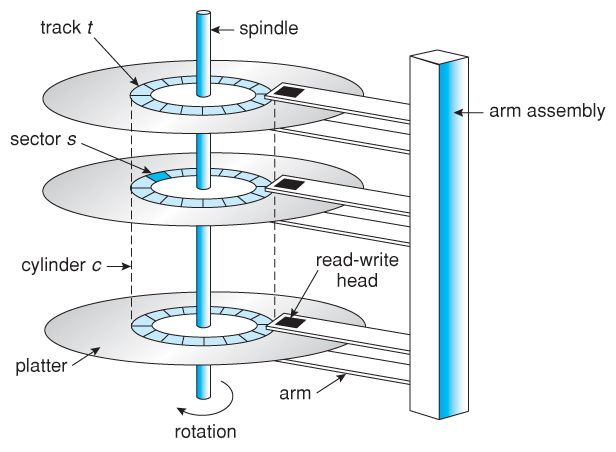
- Spindle: Thing going through center
- platter: Disk containing data
- Cylinder: Cylindrical ring (tracks) on platter (3 dimensional)
- Sector: Sector on one cylinder platter
Hard disks
Platters come from 2cm to 30 cm. The HDD range from 100 GB to 8 TB.
Transfer rate
- Transfer rate: 6 GB/sec
- Effective Transfer rate: 1 GB/sec
Seek time
- Seek time: 3ms to 12ms, 9ms for most desktop drives.
- Average seek time is measured based on 1/3 of tracks
Latency
- Latency is based on spindle speed (Rotations per minute). Average latency is half the max.
- Access latency is the same as average access time
- Access latency = average seek time + average (rotational) latency
I/O time
- Average I/O time = Average access time + (Amount to transfer/transfer rate) + controller overhead
Solid-state disks
A storage device with no moving parts.
Advantages:
- More reliable than HDD's
- Faster
Disadvantages
- Less capacity
- Shorter Life span
- slow busses
- More expensive
Magnetic Tape
Early storage device which holds data on spools of cartridges. It is mainly used as a backup storage of infrequently used data. It is kept in spool and wound or rewound past read-writer head.
Advantages:
- Relatively permanent
- Holds large amounts of data
- Cheap
Disadvantages
- Very slow access time
- Very slow random access
Disk structure
Addressed as large 1 dimensional array of Logical blocks
The 1 dimensional array of logical blocks is mapped into sectors of the disk sequentially.
- Sector 0 is the first sector of the first track on the outermost cylinder.
- Mapping goes in order through the track
- Then through other tracks in that cylinder
- Then through other cylinders outmost ot innermost.
Easy to map from logical to physical address as long as no bad sectors. However there is a non constant number of sectors per track.
Storage array
This lets you attach an array of disks.
- it provides features to the host, such as memory controlling software.
- has RAID and hot spares
- And has features as found in some file systems such as snapshots, clones, thing provisioning, replication, deduplication.
Disk Scheduling
Aim is to minimize seek time.
- Disk bandwidth: Total number of bytes transferred, divided by total time between first request for service and the completion of the last transfer.
- Os, system processes, user process all make i/O requests. And the OS maintains a queue of these requests, since the disk can only do one request at a time.
- You can imagine the movement of the disk head with a rectangular coordinate system, where one axis is seek time the other is rotational latency.
First come first serve
Just get each address in the queue. This is pretty inefficient as you're not optimizing it at all.
Shortest seek time first
Just get all the ones which are closest. this basically forms a path through the cylinders.
This algorithm is pretty good, however may cause starvation of requests.
Scan
Basically just constantly sweep from end to the other end, doing all requests when it gets to them.
C-Scan
More uniform wait time than Scan. it just treats the list as a circular list and constantly rotates around them.
Lec 8 - Disk management
Swap space management
Allocate part of disk space as virtual memory to extend main memory. You can carve this swap space out of the normal file system or in it's own disk partition.
File data is written to swap space until a file system is requested. Dirty pages go to swap space and text segments pages are thrown out and reread from file system. (not sure what this mean?)
RAID Structure
Redundant array of inexpensive disks. You have more reliability by having redundancy.
This increases the mean time to failure, by having more disks.
- Mean time to repair - exposure time when another failiure could cause data loss
- Mean time to data loss - based on above factors
- If disks fail independently this system could make it have a really long time to data loss.
Combined with nvram to improve write performance.
RAID continued
RAID split into 6 levels
- RAID 1 - Mirrowing or shadowing keeps duplicates of each disk
- RAID 1 + 0 - striped mirrors
- Raid 0 + 1 - Mirrored strips
- RAID 4,5,6 - Block interleaved parity (less redundancy)
Raid within a storage array can fail if the array fails so it is common to have automatic replication.
Stripe: Splitting data across multiple disks
Mirror: Mirroring data across disk arrays or (single disks)
Other features of RAID
Snapshot: View of file system before a set of changes take place
Replication: Automatic duplication of writes between seperate sides. This creates redundancy and disaster recovery.
Hot spare disk: This disk automatically used for RAID production if a disk fails to replace the failed disk and rebuild the Raid set if possible. This decreases the mean time to repair.
Stable storage
View count: 2416